General Information
LSU provides on-campus printing at multiple locations across campus. Standard document printing is available through our Print Stations in ITS computer labs and other designated locations. These printers and print job release stations are managed by Information Technology Services (ITS). The LSU Library's main computer lab is located on the first floor in room 141, to the left of the main entrance. Additional computer labs are available on the second floor in Room 241 and in Patrick F. Taylor, Room 1350.
Large-format and specialty printing are available through the ITS Print Desk at the following locations:
ITS Print Desk Hours of Operation
Users can upload documents to print.lsu.edu and release their print jobs at an available ITS Print Station. To pay for a print job, swipe a Tiger Card using the card reader at the printer.
Eligibility & Order Procedures
Available To: LSU Faculty, Staff, and Students.
Requirements: Must have a MyLSU Account ID & a Tiger Card, and funds on the Tiger Card to pay for printing.
Restriction: The Print Desk has 36" wide paper rolls. Files in which the width is larger than 36" CANNOT be printed.
On-Campus Printing
- Printing Instructions:
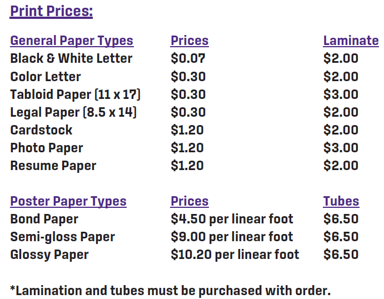
- Price to Print:
Standard document printing is available through our Print Stations in ITS computer labs and other designated locations across campus. Anyone with a valid MyLSU Account ID and a Tiger Card can remotely upload documents to any Pharos Print Station on campus. Also, your Tiger Card must have funds on it to be able to print. For more Tiger Card information, visit the Tiger Card Office.
There are multiple ITS Print Stations across LSU's campus: ITS Print Station Maps
- LSU Library
- Patrick F. Taylor
- Room 1350
- Room 1269 (Chevron Center)
- Room 2241
- Business Education Complex Rotunda
- French House
- Room 107 (Student Lounge)
- Veterinary Medicine Library
- Renewable Natural Resources
- Julian T. White (Design Bldg.)
Printing Problems
If the printer is malfunctioning or producing poor print quality, an ITS representative can assist you in receiving a refund. (Print Carefully: Refunds ARE NOT provided for mistakes that you yourself are responsible for.)
1. Bring your Tiger Card and your print job to the ITS Print Desk in the LSU Library, Room 141.
2. The ITS representative will verify that the print job was done on an ITS Print Station and re-print it at no additional cost.
3. If your account was charged for more pages than were meant to print, the ITS Print Desk can submit a Print Credit or a Tiger Cash refund request on your behalf. Tiger Cash refunds can take up to 2 weeks.
Frequently Asked Questions
What types of Printers are available?
ITS Print Stations located throughout campus primarily use letter-size paper, measuring 8.5 × 11 inches, and offer both black-and-white and color printing. Tabloid-size printers, which support 11 × 17-inch paper, are available near both ITS Print Desk locations: LSU Library, Room 141, and Julian T. White (CAD), Room 215.
What is the Maximum Size that can be printed at the Print Stations OR at the ITS Print Desk?
The maximum paper size at standard print stations is 8.5 × 11 inches, or letter size. For larger format printing, tabloid-size, 11" x 17" and 36" wide paper rolls are available at the ITS Print Desk locations. The length can be as long as you need.
- ** IMPORTANT: Files printed where the height & width create a document larger than 3 feet in width CANNOT be printed at the ITS Print Desk. **
How do I print from any computer without bringing the computer to the LSU Campus? What if I have a project on another computer that I need to print?
Save the document to a flash drive or USB drive. Once on campus, upload the file through print.lsu.edu and release it at an available ITS Print Station using your Tiger Card. For posters and other large-format documents, save the file to a flash drive or USB drive and take it to an ITS Print Desk location.
What if I am not an LSU Student or I do not have a Tiger Card or Student ID? Can I pay to print in the Computer Labs or ITS Print Desk in LSU Library?
No. A Tiger Card is required to pay for printing at all Print Stations.
Can I set up wireless printing in my office/dorm room?
No, ITS does not allow individuals to set up wireless printing in office/dorm rooms.
LSU Support & Policy Statements
Service Desk Contact Information
Policy Statements